New, on paid plans and credit packs
Describe the data. Get a scraper.
Give a page and say what you want from it. Scraper Studio writes the scraper, tests it on your pages and shows you the records. Adjust it by clicking on the page, then run it on every page of the site.
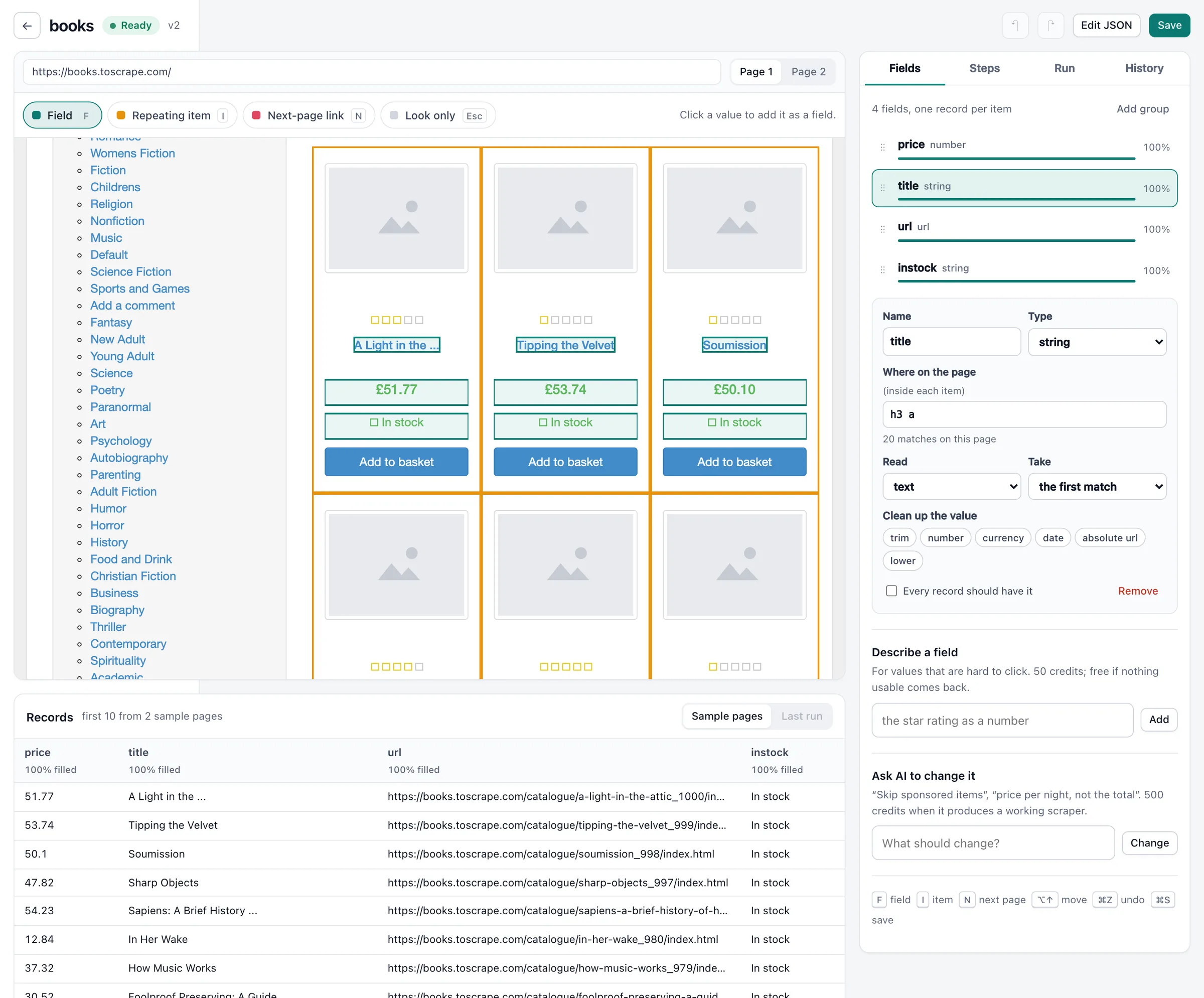
From a page to records in three steps
No selectors to write and nothing to install. Developers can do every step through the API instead.
1. Describe it
Paste a page (and up to 4 more from the same site) and write what you want: “every product with its price, rating and stock.” The scraper comes back with sample records, usually in under a minute.
2. Check it on the page
The page opens beside its records. Click a value to add a field, click a card to split the page into records, click “next” to follow pages. Drag fields to reorder or group them. The records update as you go.
3. Run it anywhere
Run it on any page of the site from the editor, the API or an AI assistant over MCP. Put it in a job to run thousands of pages, repeat it on a schedule, and send the records to S3 or Google Cloud Storage as JSON or CSV.
What you get
A scraper you can read
What gets built is a recipe: which block on the page is a record, and where each field sits. No code runs on your behalf. You can open it as JSON, edit it by hand and go back to any earlier version.
When the site changes
When a site changes and a scraper stops finding its fields, AI reads the page so records keep coming, and the scraper repairs itself. Pages read that way are marked in the results.
You only pay for records
A page that returns no records costs nothing, and a build that does not end in a working scraper costs nothing. Every answer says what it charged.
Same key, same credits
Studio runs on the API key and credit balance you already have, and shows up in Usage and Requests like any other call.
What it costs
Studio runs on your credits. A page that returns no records is free, and so is a build that does not work.
| What | Credits | Notes |
|---|---|---|
| Build a scraper with AI | 500 | Plus each sample page fetched. Free when no working scraper comes out. |
| Change it by asking AI | 500 | Free when the change does not produce a working scraper. |
| Add a field by describing it | 50 | Free when nothing usable comes back. |
| Run a page | 3 | 10 when the page needs JavaScript, 20 on the premium network, 100 for both. Pages with no records are free. |
| A page AI reads because the site changed | +40 | For up to 25 records, then +20 for each further 25 (100 at most a page). |
| Automatic repair | Free | At most once a day for a scraper. |
| Saving, editing, testing on your stored pages | Free |
Questions about Scraper Studio
Who can use Scraper Studio?
Scraper Studio is included with every paid plan and credit pack. Trial accounts can see it in the dashboard; a credit pack or plan opens it.
Do I need to write code?
No. Describe the data, then click on the page to add or fix fields. Developers can do the same through the API (/v1/studio) or let an AI assistant drive it over MCP.
What kinds of pages does it work on?
Public pages with the data in them: listings, product and pricing pages, tables, directories, job boards. Pages that only fill in after JavaScript runs work too, at the render price. Pages behind a login are not supported.
What happens when the site changes its layout?
When a site changes and a scraper stops finding its fields, AI reads the page so records keep coming, and the scraper repairs itself. Repairs are free. If a repair cannot find a working version, the scraper is marked “site changed” and you can fix it on the page or ask AI to change it.
How is this different from the Web Scraping API?
The Web Scraping API returns a page as HTML, Markdown or text and leaves the parsing to you. Scraper Studio returns records: named fields, typed as numbers, dates, links and lists.
How do I run it on a schedule?
In Jobs, use the operation studio_run with the pages to scrape, repeat it hourly, daily or weekly, and choose an S3 or Google Cloud Storage bucket for the results.
Build your first scraper
Included with every paid plan and credit pack. Describe the data, check it on the page, run it on the whole site.
7,500 credits, one-time. No subscription. Or try it free: 50 calls, no card.
- See pricing Plans, packs and every price
- Talk to sales Volume, custom terms, invoices
- Read the quickstart First call in five minutes